๐ŸŒฑ ALPHA Be one of our founding families

Free access during Alpha ยท Help shape the future of family digital wellness

Helping Families Thrive in the Digital Age

Words, not walls. Communication over control.

Thriva helps families create a Device Availability Plan together - a collaborative agreement about when devices are available for focused work, family time, or free use.

Parent and child collaborating on a tablet

Our Philosophy: Words, Not Walls

Thriva is not a "parental control" tool. We're a family digital wellness platform that supports the plan you create together.

Built by a parent frustrated with apps that created more fights than focus. Traditional parental control apps impose restrictions, creating screen time battles and damaging family relationships. Our approach is different: help families create a Device Availability Plan together, then support that plan with structure and encouragement.

What We Stand For:

Communication first Collaboration over control Building self-control Family harmony Intrinsic motivation Growing together

The difference? When a child is in "Focused Mode," they're not locked out - they enter ThrivaOS, a dedicated environment with their tasks, calendar, AI assistant, Habitica character, approved educational apps, and a rewards shop. It's a curated experience, not a punishment. And because they helped create the schedule, they understand why it's happening.

Why Families Love Thriva

Powerful tools designed for real family life

๐Ÿ–ฅ๏ธ

ThrivaOS: A Focused Environment

During Focused Mode, children access ThrivaOS - a dedicated dashboard with tasks, approved apps, educational websites, calendar, and an AI assistant. It's not a locked device; it's a curated experience.

Many kids prefer it for homework - removes the struggle of resisting distractions.

๐Ÿค–

AI Assistants for Everyone

Parents get an AI coach for schedule suggestions, troubleshooting, and parenting insights. Children get a safe companion who can help with tasks, explain schedules, and offer encouragement.

Personalized to your family - no generic advice.

๐ŸŽฎ

Gamification with Habitica

Integrated with Habitica to turn real-life tasks into an RPG adventure. Kids create characters, earn gold, level up, and fight bosses by completing homework and chores.

Tasks sync automatically. Real motivation, not bribery.

๐Ÿ“‹

Tasks & Required Responsibilities

Create tasks with due times. Mark tasks as "required" to block Free Time until they're done. Kids see exactly what's needed to unlock their device - then complete it themselves.

Natural consequences without nagging.

โฑ๏ธ

Time Budgets & Earned Freedom

Set daily or weekly screen time budgets. Children can see how much time they have and choose how to spend it. When budget is exhausted, device transitions to Focused Mode automatically.

Teaches self-regulation through visible limits.

๐ŸŽฏ

Person-Based, Not Device-Based

Set modes for children, not devices. When you set Emma to "Focused Mode," it applies to her laptop, tablet, and phone simultaneously - within 30 seconds.

Perfect for families with shared computers or multiple devices per child.

๐Ÿ“…

Smart Scheduling

Create schedules together in a guided wizard. Set automatic transitions for bedtime, homework, and family time. Children get 5-minute warnings before changes - no surprises.

Google Calendar integration for events and activities.

๐ŸŒ

Curated Apps & Websites

Approve educational websites (Khan Academy, Google Classroom, school portals) and specific apps per child. Different rules for different ages. AI helps categorize new sites.

Shows what's available - positive framing, not a blocklist.

๐Ÿ”’

Privacy-Focused

We track app/website duration, not content. No screenshots, no keystroke logging, no message reading. Your family's data stays yours - never sold, never shared.

Structure without surveillance.

Three Simple Modes

A shared agreement about when devices are available for different activities

๐ŸŽฎ Free Time

Full device access - normal desktop/home screen with all apps available. Children can use devices freely to explore, create, play games, and connect with friends.

Optional time budgets help children self-regulate. 5-minute warning before mode changes.

Use for: After responsibilities, weekends, earned time

๐Ÿ“š Focused Mode

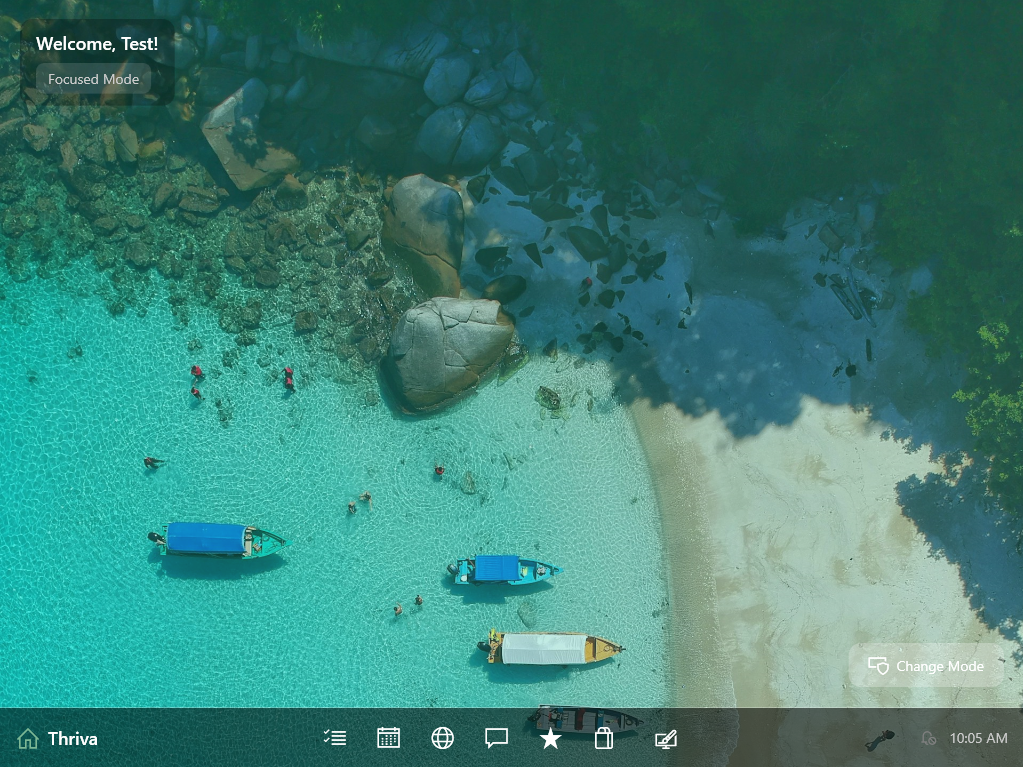
ThrivaOS replaces the desktop/launcher. Children access their task list, calendar, approved educational apps, allowed websites, AI assistant, and Habitica - nothing else.

Not punishment - a distraction-free environment. Many kids prefer it for homework.

Use for: Homework time, morning routines, after school

๐ŸŒ™ Quiet Time

Device is at rest. On Windows, user is logged out. On Android, screen is locked. Encourages presence, sleep, and family connection.

Essential for healthy sleep habits. Kids know exactly when it starts - no surprises.

Use for: Bedtime, dinnertime, family activities

See It In Action

Real screenshots from ThrivaOS and the Parent Portal

ThrivaOS on Windows - focused learning environment

ThrivaOS on Windows - A beautiful, distraction-free desktop with tasks, calendar, and approved apps

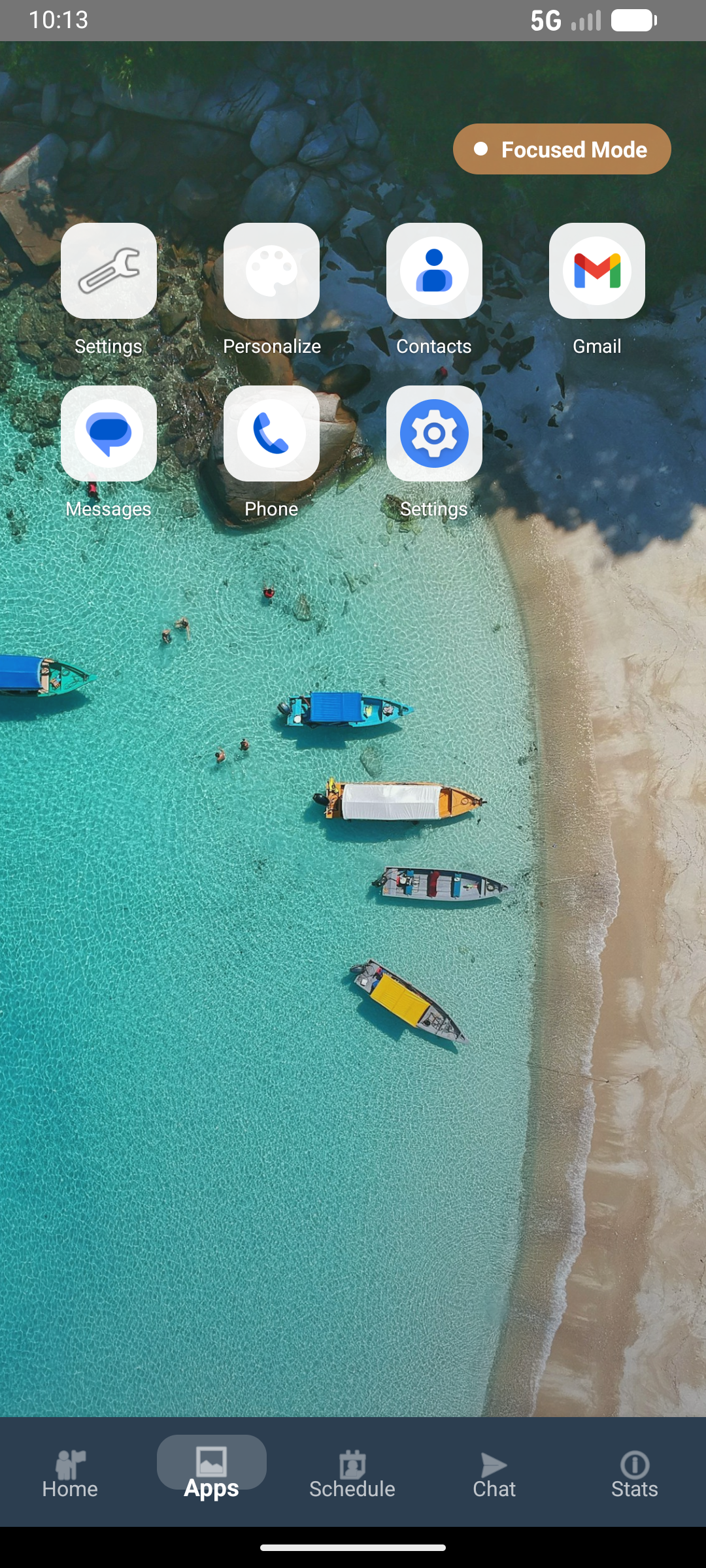
ThrivaOS on Android - Focused Mode apps

ThrivaOS on Android - Only approved apps visible during Focused Mode

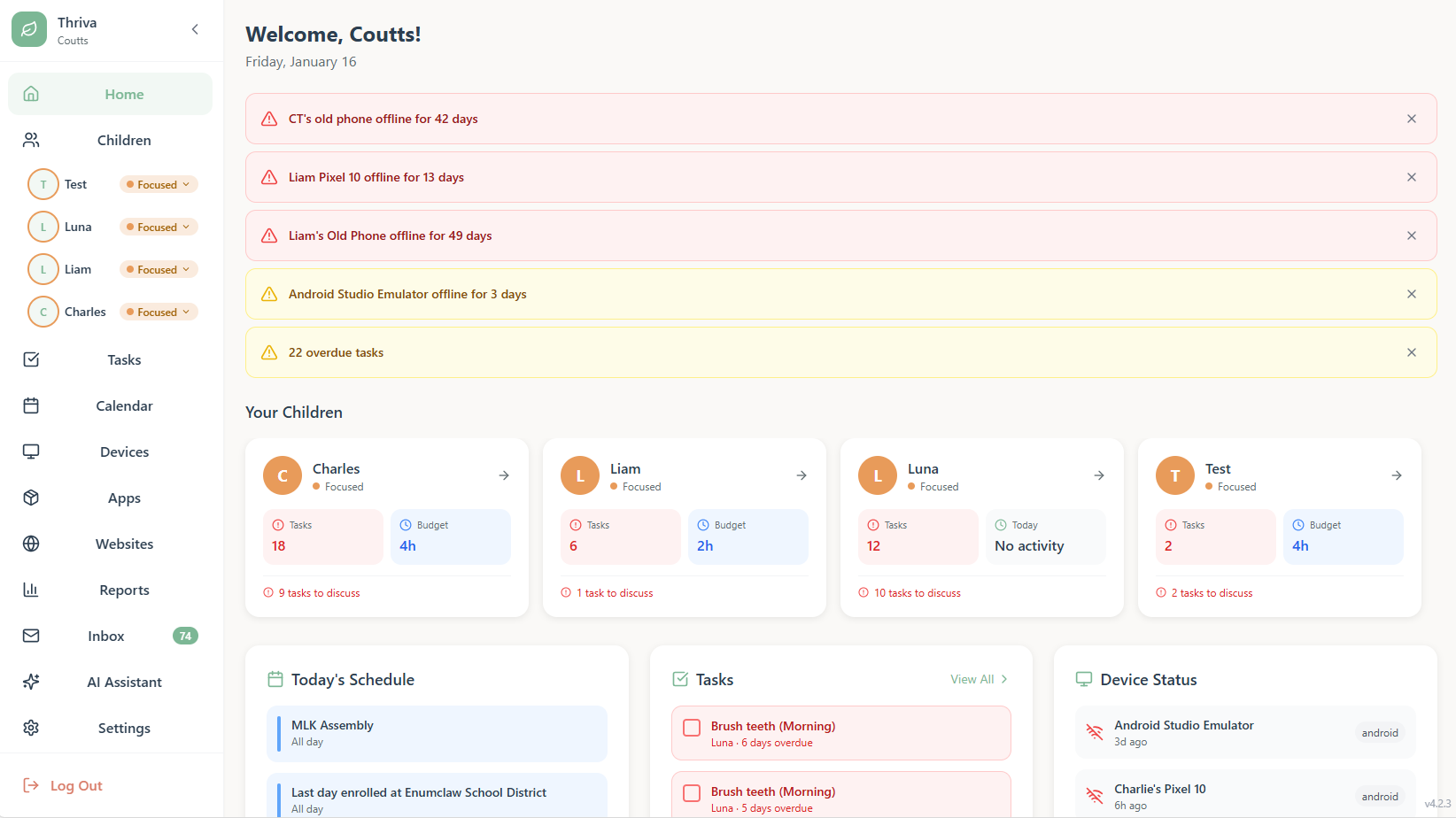
Parent Portal dashboard showing children's status

Parent Portal - See all your children at a glance with tasks, schedules, and device status

How It Works

Start a conversation, then let Thriva support it

1
Have the Conversation

Talk with your kids about technology use. Use our discussion guides to explore what healthy balance looks like together.

2
Create the Plan Together

Use our guided wizard to build a Device Availability Plan. Children help decide when modes apply - it's their plan too.

3
Install on Devices

Download Thriva on Windows computers and Android devices. Assign children to their usernames. Takes about 5 minutes per device.

4
Review & Adjust

The plan enforces itself automatically. Check in periodically, review what's working, and adjust together as kids demonstrate responsibility.

Works on Your Devices

Available now on Windows and Android

Available Now
💻

Windows

  • ✓ Windows 10 & 11
  • ✓ Background service
  • ✓ Auto-updates
  • ✓ Multi-user support
  • ✓ No Python required
Available Now
📱

Android

  • ✓ Android 7.0+
  • ✓ Background monitoring
  • ✓ Device administrator
  • ✓ App launcher control
  • ✓ Auto-sync
Coming Soon
🍎

iOS

  • • Screen Time API
  • • App management
  • • Family coordination
  • • Full feature parity
  • • Native iOS app

Simple, Transparent Pricing

Start with a 14-day free trial - No credit card required

Monthly Yearly Save 17%

Essentials

$ 14.99 /month

Core digital wellness for families

  • Unlimited devices
  • Up to 5 children
  • 3-mode system with ThrivaOS
  • App & website management
  • Smart scheduling with wizard
  • Time budgets
  • Tasks & rewards system
  • Habitica integration
  • Parent AI Assistant
  • Child AI Chatbot
  • Email-to-Tasks AI

Then $14.99/month

Frequently Asked Questions

Can I cancel anytime?

Yes! Cancel anytime from your account settings. No questions asked, no cancellation fees.

What happens after my trial?

You'll receive email reminders. You can choose a plan or cancel before the trial ends. No automatic charges.

Can I change plans later?

Absolutely! Upgrade or downgrade anytime. Changes take effect immediately with prorated billing.

What payment methods do you accept?

All major credit cards via Stripe. Your payment information is never stored on our servers.

Ready to Help Your Family Thrive?

Join our founding families who believe in words, not walls

Join the Alpha

Free during Alpha ยท No credit card required ยท Help shape the product

🍎 For Teachers & Educators

โ–ผ

Supporting Digital Citizenship & Focus in Education

Classroom Applications

While Thriva is designed for families, educators can recommend it to parents as a complementary tool for:

  • Homework Focus: Parents can schedule Focused Mode during homework time, giving students a distraction-free environment that still allows access to learning resources
  • Digital Citizenship: Teaches students self-regulation and healthy device habits that extend into school
  • Home-School Connection: Parents can coordinate structure that supports classroom expectations
  • Task Management: Habitica integration helps students track homework and build organizational skills
Why Teachers Love It
  • Supports Learning at Home: Students arrive more focused and prepared
  • Builds Executive Function: Task lists and scheduling teach planning skills
  • Reduces Tech Conflicts: Parents have tools to manage device time, reducing stress at home
  • Encourages Responsibility: Students earn freedom through demonstrated self-control
  • Complements SEL Programs: Aligns with social-emotional learning goals
🎓 Coming Soon: Teacher Portal

Bridging the Home-School Gap

We're exploring ways for educators to collaborate with families using Thriva. Parents will be able to invite teachers to view (with permission) student progress, enabling true home-school partnership.

Privacy First: Full FERPA compliance, granular parental controls, and transparent access logs. Teachers see only what parents explicitly share.

🧠 For Therapists & Mental Health Professionals

โ–ผ

Supporting Family Wellness Through Evidence-Based Approaches

Why Therapists Recommend Thriva
  • Aligns with Autonomy-Supportive Parenting: Grounded in Self-Determination Theory and evidence-based approaches
  • Reduces Family Conflict: Addresses screen time battles - one of the most common presenting issues for families
  • Builds Intrinsic Motivation: Structure that develops self-regulation, not external dependence
  • Supports Executive Function: Schedules, tasks, and routines that build planning skills
  • Creates Conversation Opportunities: The Device Availability Plan process itself is a therapeutic exercise in family communication
Clinical Applications
  • Family Therapy: Recommend to families presenting with screen time conflicts as a tool for implementing family agreements
  • Gradual Autonomy: Supports interventions that build independence over time
  • CBT & Family Systems: Compatible with cognitive-behavioral and family systems approaches
  • Data-Informed Conversations: Usage patterns can inform therapeutic discussions
  • Homework Support: Structure that supports treatment plan compliance
Key Differentiator

Thriva is a family wellness tool that supports treatment plans, not a clinical intervention.

Unlike surveillance-based "parental control" apps that often increase family tension, Thriva focuses on collaborative planning and communication - supporting the therapeutic goal of family harmony.

Future Vision: Professional Collaboration

We're exploring ways for professionals (therapists, teachers, pediatricians, coaches) to collaborate with families using Thriva - with full consent and privacy controls.

Designed with privacy in mind. Details to come as we develop this capability with input from clinical professionals.

🏠 For Parents

โ–ผ

Creating Healthy Digital Habits Together

Starting the Conversation

The key to success with Thriva is framing it as collaboration, not control:

  • "Let's create a plan together" instead of "I'm installing this on your devices"
  • "This helps us coordinate" instead of "This blocks you from stuff"
  • "You can still do X, Y, Z" instead of "You can't do anything"
  • Emphasize earning freedom through demonstrated responsibility
Pro Tip: Set up their Habitica account together. Let them choose their avatar, pick initial quests, and decide what real-life tasks they want to track. This gives them ownership and makes it feel like their tool, not yours.
Age-Appropriate Guidance

Elementary (6-10):

  • Use scheduled modes for routines (bedtime, dinner, homework)
  • Habitica for chores and basic tasks
  • Frequent check-ins and adjustments

Middle School (11-13):

  • Involve them in schedule creation
  • Give them agency over Free Time choices
  • Use Habitica for homework tracking

High School (14+):

  • Transition to self-management with safety nets
  • Fewer scheduled modes, more trust-building
  • Gradual reduction as they demonstrate responsibility
Building Independence

The goal is to work yourself out of a job:

  1. Start with structure: Scheduled modes, clear boundaries
  2. Involve them in decisions: Ask what times work for homework focus
  3. Grant increasing autonomy: Reduce Quiet Time as they demonstrate bedtime responsibility
  4. Celebrate progress: Point out when they self-regulate without prompting
  5. Phase out gradually: By late high school, they should rarely need active management

🎮 For Kids & Teens

โ–ผ

Level Up Your Real Life

What's In It For You?

We get it - another thing your parents installed. But here's the thing: Thriva is actually designed to give you MORE freedom, not less.

Here's how it works:

  • You earn free time by showing you can handle responsibility
  • You still have access to your dashboard, tasks, and Habitica even in Focused Mode
  • You can see the schedule so you know exactly when restrictions lift
  • You level up IRL by completing real-world tasks and earning gold in Habitica
Think of it like this: Your parents could just take your devices away entirely. Instead, they're using Thriva to create structure. Show them you can work with it, and they'll trust you with more freedom.
Habitica: Gaming Your Life

The coolest part of Thriva is Habitica integration. It turns your real life into an RPG:

You have a character:

  • Choose your avatar (Warrior, Mage, Healer, Rogue)
  • Level up by completing real-life tasks
  • Earn gold, gear, and pets

Complete quests:

  • Fight bosses by finishing homework
  • Collect eggs by doing chores
  • Join party quests with friends
Real Talk

Your parents installed Thriva because they care about you developing good habits. They could have chosen tools that just block everything. Instead, they picked something that:

  • Gives you a clear path to earning freedom
  • Makes real-life responsibilities feel like a game
  • Shows them when you're being responsible (so they can back off)
  • Teaches skills you'll actually need in college and life

Work WITH the system, not against it. You'll get more freedom faster.

🤝 For Partners & Integrations

โ–ผ

Integration Opportunities & Partnership

Current Integrations
Habitica
Full integration: Task syncing, avatar display, quest progress, stat tracking. Thriva is Habitica's perfect companion for families - adding real-world structure to the gamification.

What makes our Habitica integration special:

  • Real-time avatar display in child's dashboard
  • Task completion syncs instantly
  • Parents can see Habitica progress without needing separate login
  • Focused Mode gives children access to Habitica during structured time
Integration Opportunities

We're actively seeking partnerships with:

Educational Platforms:

  • Learning management systems (Canvas, Google Classroom)
  • Educational content providers (Khan Academy, IXL)
  • Reading apps and digital libraries

Productivity & Wellness:

  • Focus apps and timers
  • Meditation and mindfulness apps
  • Exercise and activity trackers

Family & Parenting:

  • Chore tracking apps
  • Allowance and financial literacy tools
  • Family calendar and coordination platforms
API & Technical Integration

Thriva provides a REST API and MCP (Model Context Protocol) server for integration.

Base URL: https://api.thriva.app/v1

Authentication: Bearer token

Key Endpoints:
- GET /children - List family members
- POST /children/{id}/mode - Set mode
- GET /scheduled-modes - View schedules
- POST /tasks - Add tasks to dashboard

Documentation: docs.thriva.app

🤓 For Nerds & Developers

โ–ผ

Technical Architecture

Person-Based Structure (Not Device-Based)

Thriva's core innovation is managing structure per person, not per device. This is non-trivial:

  • Each child can have multiple usernames across multiple devices
  • Setting a mode for a child affects all their accounts simultaneously
  • 30-second sync time across all devices via polling
  • Stateful reconciliation every 5 seconds ensures consistency
Parent sets: Child "Johnny" -> Focused Mode | API updates: child.mode = "focused" | All devices with Johnny's usernames check API every 30s | Windows Service + Android App enforce mode within 30s | Reconciliation loops verify state every 5s
High-Level Stack
  • Backend: PHP 8.3.6, MySQL 8.0.43
  • Windows: Python -> .exe (PyInstaller)
  • Android: Java (SDK 24+)
  • Frontend: React (Parent Portal)
  • API: REST + MCP Server
  • Database: 85 tables
  • Updates: Built-in auto-update
API Endpoints
POST /devices/register
GET /client/status
POST /client/logs
GET /children
POST /children/{id}/mode
GET /scheduled-modes
Database Schema
- Multi-tenant with account_id filter
- accounts, devices, children
- user_accounts (many-to-many)
- scheduled_modes, debug_logs
- client_versions, audit_log
Security
- Bearer token auth for devices
- Time-limited registration codes
- Complete data isolation per family
- Audit logging for all actions
- No cross-account queries
Key Design Decisions
- Monorepo structure
- Subdomain organization
- Auto-update from day one
- Semantic versioning
- Person-based not device-based

Current Version: Windows Unknown | Android 2.21.0 | ThrivaDesktop 1.10.1 | API v1.22.0